
What’s New in BirdPress
January 2026
- New default Accordion block (from the WordPress Core). The BirdPress Accordion block will not be going away due to legacy concerns, however, we recommend converting accordions to the new block if you are actively updating the content under them.
- You can now hide blocks from the page, but they will still be listed in the Document Overview
- You can now add notes to blocks, similar to comments in word documents
- You can now have gallery images display in two or three columns on mobile. This option is in the block sidebar, under Gallery Styles > Mobile Columns
- Optional, but recommended: We have tested a new content accessibility plugin called Editoria11y Accessibility Checker. This plugin gives instant feedback to editors about missing alt tags, skipped headings, general quality assurance and more. Contact the tech team to install this on your website.
May 2025
- Added ability to change the height of the hero image.
Ratio options include (tallest to shortest) 2:1, 5:2, 8:3 and 3:1. - Gallery slideshow can now show multiple images at once
- Site favicon (icon that displays in browser tab) can be changed in Customize settings. Default is the Lab’s Sapsucker icon – only change in special cases when a site has its own logo.
February 2025
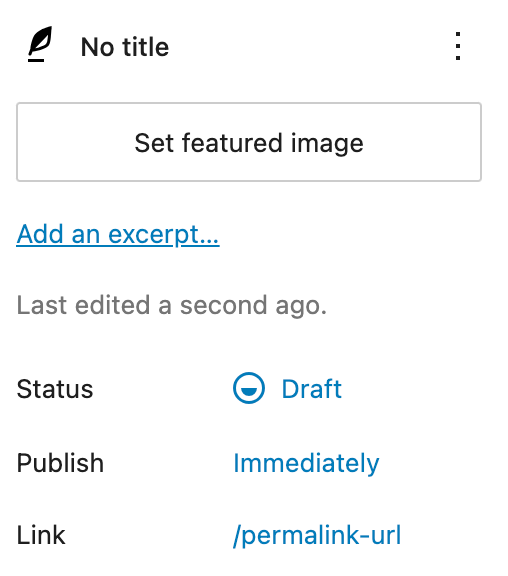
Post Options Change
As of WordPress 6.6, the location of the featured image and excerpt options for posts and pages has moved to the top of the post sidebar. They used to be in their own panels. See screenshot.
Layout & Template
- Default search results sorts by relevance
- Results order is: First, whether the entire sentence is matched. Second, if all the search terms are within the titles. Third, if any of the search terms appear in the titles. And, fourth, if the full sentence appears in the contents
- Hero grid style (example is on Yang Center website)
- Ability to change the button color in the hero (per page)
- Added new Block Patterns and reorganized categories
New Block Features
- More color options for buttons
- Tag filter added to article lists, so tags can be filtered the same way as categories
- Add masonry grid style to the gallery block
- Ability to limit the width on the slideshow block
- YouTube videos now show related videos from the video’s channel
Features for Sites with Partners
- Partner logos added to Customize (example display is on birdcount.org)
- Ability to change the Global CTA background color in customize since it is being used as a partners area on sites
- Fixes to gallery block being used as a partner logo display
New Features & Updates since BirdPress 3
March 2024
Features & Bug Fixes
- Aspect ratio options added to the image block
- Cover block captions: new custom option under the “Captions” panel to add caption to the Cover block using the “Caption” custom field
- Hide Group blocks: new custom option under the “Other Helper Classes” panel to hide a group block from users without having to delete it – this is useful if content needs to be hidden temporarily, but you do not want to completely remove it from the page
- Article list block fix in admin: block no longer reloads every time it is in the viewport – this used to cause a jump on the page
Documentation
- Accessibility for Content Editors now lives on the brand website
- Need a refresher? Check out the updated Training Outline for a summary on using BirdPress
- Available block list added to the Block Editor landing page
- Block pages have block listing at the top of the page for easier access
BirdPress 3 and the new Cornell Lab Brand
September 2023
Most of what you are used to for content editing has not changed. Some new features and branded elements are now available.
The new Cornell Lab brand
- Updated Cornell Lab logo and product logo lock-ups
- New color palette used throughout the site
- New typography font faces are automatically used for headers and paragraph text
- Block Patterns are available that follow our brand guideline recommendations
- Hero images get an updated look
New core blocks
- Details Block – new block from WordPress that is similar to our custom accordion block
- Footnotes Block – add footnotes with automatic links from the content to the footnotes block
Block Styles and Settings
The block sidebar has several new panels with options to assist styling needs for most blocks. In BirdPress 2, these styles were all under the Advanced panel.
- See block styles for more information
- Add the leading/connecting line using the spacer block
- The group block now has different background colors available to call out content
- More text sizes are available on paragraph and header blocks
- Add the connecting line with the block inserter or as a transformation of the spacer block
- Photo captions can now be added to the article list block
- New alternative layouts for the article list block in card display
New Customize Options
- New theme colors available (default is Gold)
- Add Pinterest to the social media sites for both sharing and in the footer social links
- Add a donate button to the footer
Updated documentation
- See birdpress.allaboutbirds.org
- Updated screenshots and better descriptions of available blocks with their styles and settings
After your site is upgraded
- We recommend that you look through your website to make sure everything looks as it should
- Pay attention to differences caused by the new font faces
- If anything looks off, contact Melissa and we can work through it